WTFilesystem
09-22-2025·8 min read
What even is a File?
In the computer world, no matter your starting point, if you trace the execution or processing down its path long enough, you will always reach the same thing: bytes. Bytes, which are just a collection of 8 bits, which are just values that can be a 1 or a 0, power the entire world. Isn't that crazy?
To your machine, everything is just an endless stream of bytes. Your vacation photos? Just bytes 47,392,847 through 52,891,203. Your resume? Bytes 103,847,292 through 103,891,847. That important presentation? Scattered across bytes 8,472,001 through 8,891,334. In fact, the concept of a "file" doesn't exist to modern Operating Systems. Which begs the question: how does the chaos of numbered storage locations become the digital filing cabinet you navigate effortlessly every day? How does typing /Users/johnDoe/Documents/taxes_2024.pdf magically find the right collection of bytes among billions?
The answer is one of computing's most elegant solutions to an impossible problem: filesystems.
Filesystem Fundamentals
Filesystems are meant to solve three questions as efficiently as possible:
- Where is the data?
- What is the data?
- How do you find the data?
The answer to where will set up the rest of the discussion. A typical machine in modern times has around 8GB of RAM and anywhere around 500GB to 1TB of storage spaceStorage devices are pretty cool as they are the physical representation of your "files", but I won't go into how they work for this blog. Having a massive storage space is great, but it requires a refined approach to organizing data. The industry nowadays organizes storage devices into collections of blocks. Blocks are simply fixed-sizeWhich is not a perfect solution as it results in fragmentation collections of bits. Notably, there is no metadata stored within each block, so managing complex tasks like access permissions or symlinks is not possible without higher-level implementations.
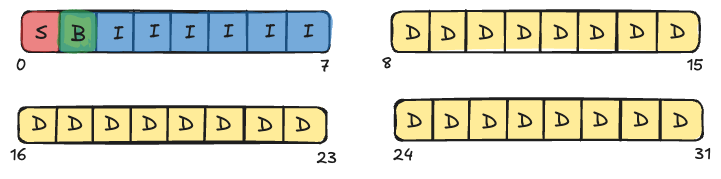
In UNIX systems, the finer-grained control of blocks comes in the form of inodes. Inodes hold important metadata for data blocks that start to create a filesystem that resembles those that we use today. Among other information, inodes store: type (file or directory), owner of the file, permissions, size, and pointers to data blocks. Operating systems refer to files as their i-number, or the index in the fixed-sized array of inodes that map to the given file block. So, when you open a file, let's say a PDF of your homework assignment, your machine accesses this through the mapping of inode to file data which are just bytes in blocks on a storage device. The lookup process of an inode is facilitated by a superblock. The superblock serves as the filesystem's roadmap, containing essential parameters like block size, total block count, and the locations of critical structures like the inode table and free space bitmaps. Finally, the last key component is the bitmap, which simply tracks whether an inode or a datablock is free (0) or occupied (1), allowing for optimized determination of where to put data. Here is an oversimplified drawing of what this structure looks like, notice the relative proportions of each component.
Improving the Design
We still have yet to touch on the distinction between files and directories at an implementation level. As mentioned above, inodes contain a type field, denoting whether the data at a block represents a directory or a file. If the inode is pointing to a directory, that changes a few things. A directory inode will contain a list of inode-to-file mappings, where each mapping contains a filename, an inode number, and maybe a file typeBy default, directory inodes always contain . and .. directories. A great way to visualize this is by walking through what happens when running the command ls in the terminal. The first step is to load the current directory's inode into memory from disk. After this is done, parse through all of the data blocks and iterate through directory entries and assemble output. Pretty simple, right?
Another blind-spot right now is handling large files and directories. A single block on a disk is typically 4KB. If you had a file that was less than this or at least a small multiple of it, there won't be any problems. But what about a large directory containing all of your applications? Having inodes maintain a collection solely of direct pointers to data blocks is certainly not the most efficient approach. To fully support a scalable solution to large entries, operating system developers introduced the concept of indirect block pointers. At a high-level, inodes have single, double, and triple indirect pointers. The single-indirect pointer stores the address of an indirect block, which just contains a list of data block locations. If we say that each address is 4 bytes, then each single-indirect pointer can store 4MB of data. Intuitively, the double-indirect pointer stores the location of an indirect block that maintains a list of indirect block addresses which all store pointers to data blocks. Each double-indirect pointer can hold 4GB of data, and this pattern follows for the triple indirect pointer, except each triple indirect pointer has a capacity of 4TB!
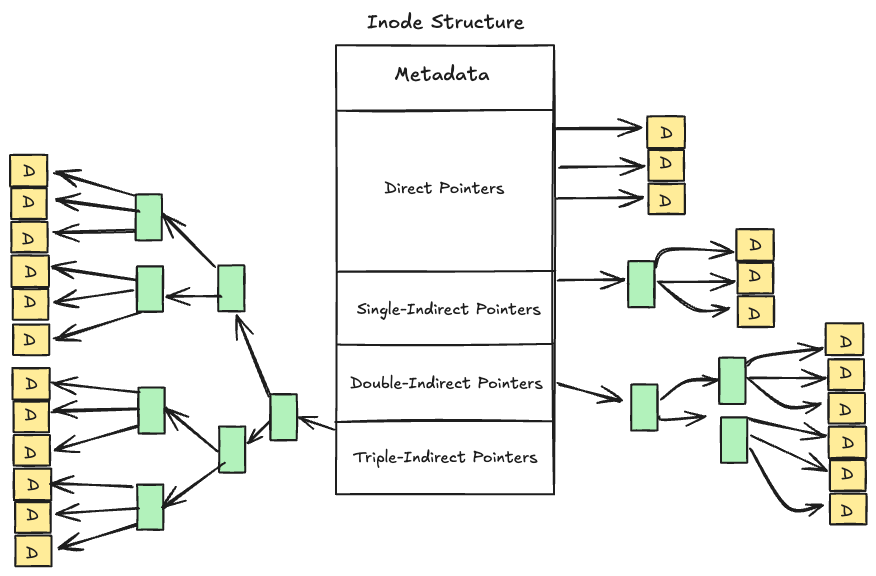
The hierarchical design is a great approach as it allows for the same base unit of storage (blocks), while achieving support for small and large files. However, modern filesystems now tend to shy away from indirect pointers as they require a massive number of addresses to be stored, maintained, and accessed. Nowadays, extents are a better alternative to indirect pointers. Instead of storing 1000 inode addresses from indices 1000-2000, the inode can maintain just two pieces of information, start and length. Similar to how std::string_view works in C++, extents are powerful as they drastically reduce the overhead in maintaining context of a file. Of course, this does not come free of charge as it requires data blocks to be allocated contiguously which has problems and complexities in its own regard.
Performance & Reliability Breakthroughs
This design gives us a working filesystem, but it still lacks the reliability and performance improvements that make modern storage systems practical for real-world use.
As far as reliability goes, let's imagine that you are writing a paper for a class or for a job and all of a sudden your system crashes. Or, in a general case, your work is saved but is unexpectedly terminated. Given the delayed writes of files, a simple concept meaning that just because you save a change to a file it does not guarantee the changes are reflected on diskThis is done for performance reasons. Writing to disk on every change to a file would be catastrophic in terms of wasting CPU time, what would happen here? Well, without any sort of crash-tolerant system, your changes would be forgotten. Luckily, developers found a novel approach to this problem through introducing the journal. Journaling works like keeping a rough draft before writing the final copy. Before making any changes to the actual filesystem structures, the journal records what's about to happen. If a crash occurs, the system can either complete the interrupted operation or safely undo it.
A notable improvement in the performance area still to be touched on is the idea of block groups. Hardware disk components take time to find the relevant data that has been requested. If you think about it, the device spends precious time moving through bytes until it reaches the relevant inode, and then it may spend even more time doing the same thing to find the given data block. We can take better advantage of locality by grouping blocks together. Instead of having one superblock, one bitmap, a few inodes and then a bunch of data blocks all in one group, we can create smaller groups of the same components. This means that we could have 4 groups that each consist of a backup superblock, a bitmap, some inodes and then data blocks. This allows the hardware device to spend less time on average finding the inode and data blocks as they are much closer together.
Tying it All Together
In the first section, I mentioned three questions that a filesystem must have great answers to. Hopefully by now the answers are clear, but if not, here is the brief idea. "Files" are stored in data blocks on hardware devices. These data blocks are nothing but bytes so they need additional context and metadata to be useful, which is where inodes come in. Inodes are managed and allocated with the help of the superblock and bitmap, which reside over the whole filesystem. These tools are combined together to create the system that we interact with every day, allowing for organizing raw bytes into the familiar hierarchy of files and directories we interact with daily. Various improvements over the years have greatly improved performance and reliability for filesystem interactions. If this was interesting, I would recommend checking out how different filesystems like ext4, which focuses on general applications, XFS, which handles high-performance servers, and ZFS, which stresses data-integrity, implement their own renditions of these ideas and the tradeoffs behind such choices.